


Satisfying Coloring
4.483.00 Reviews
App Specs
- Version
- 6.3
- Updated On
- License
- Free
- Downloads
- 50,000,000+
- Developer
- Mad1 Games
- Categories
- Casual
- Platform
- Android
Screenshots
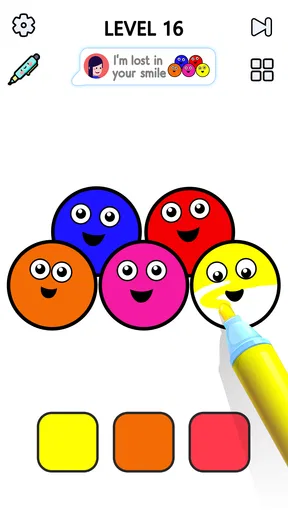
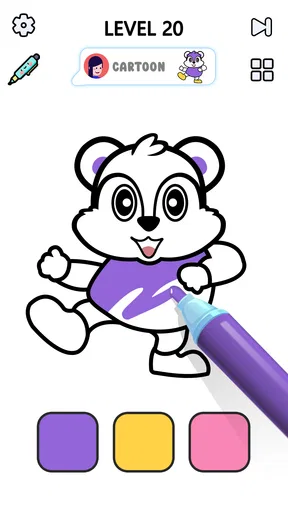
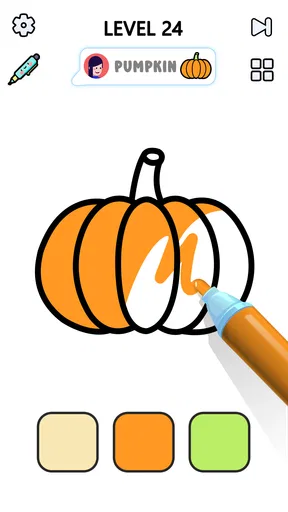

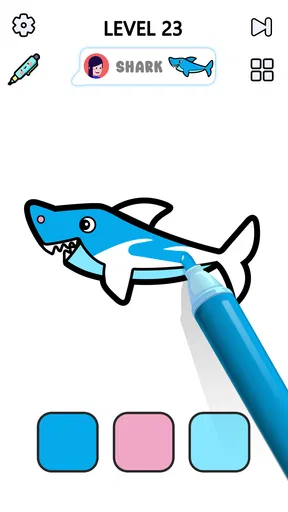
 Analysis by AppCompare
Before settling into a coloring session, I’d treat this as a simple tap-and-swipe game rather than a full digital art studio. That distinction matters: the appeal is quick, low-pressure coloring, not precise drawing or building a portfolio. If you’re choosing between this and a sketching app, decide whether you want to fill prepared pictures or make artwork from a blank page. I reach for Satisfying Coloring when I want the first kind of break.
Where a session can lose its calm
The basic interaction is straightforward, but a relaxing game can still feel frustrating if a tap does not do what you expect. I find it helps to pause and check whether I’m touching the part of the picture I mean to fill, especially when working on a small detail. If the picture is crowded, zooming in before coloring is more comfortable than repeatedly correcting a rushed tap.
There is also a difference between wanting a few quiet minutes and wanting a long, uninterrupted creative session. The app’s light, casual approach suits the first better. Ads can interrupt the rhythm, so I would not choose it when I need uninterrupted focus or when a sudden interruption would be especially annoying. That is a practical trade-off to keep in mind before opening it during a short break.
A few sensible checks before you start
Satisfying Coloring is free to download, with optional in-app purchases listed at $4.99 per item. I’d begin without spending anything and see whether the core coloring loop holds my attention. If a purchase prompt appears, I would read it carefully and decide whether the specific offer addresses a real annoyance; I would not assume that paying changes every part of the experience.
The game is from Mad1 Games, is rated Teen, and its current version is 6.3. It supports Android 7.0 or later. Those details are worth checking against the device you plan to use, particularly if you’re setting it up on an older phone or helping someone else install it. On iOS, I’d check the relevant store’s device compatibility before downloading rather than assuming the Android requirement applies there too.
If the app feels awkward at first, I’d keep the first attempt simple: open a picture, try a broad area, then test finer details once the tap-and-swipe response feels familiar. This avoids mistaking unfamiliar controls for a problem with the artwork. For a calmer first session, I’d also choose a time when I can stop easily, instead of starting a detailed picture just before I need to leave.
Recovering your flow without overcomplicating it
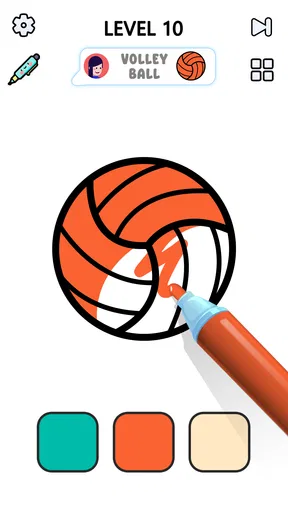
If a color lands in the wrong place, the undo control described in the game’s experience is the obvious first step. I’d use it promptly rather than trying to cover the mistake with another color, which can make it harder to tell what happened. Zooming in can help with careful areas; zooming back out occasionally is useful too, because it lets you judge whether the overall picture still feels balanced.
Worth Reading Before You Choose

EA SPORTS FC Mobile 26 Is a Bigger Football Game, but It Takes Time

Flipboard Shows What News Apps Must Do Beyond the Feed

Switching to Android Auto Means Rethinking Your Driving Routine

Google Calendar Makes a Crowded Week Easier to Manage

Ludo King Makes the Most of the Minutes Between Plans

Baby Panda World Brings Quick Play to Modern Phones, but Its Game Library Feels Busy
For a daily coloring habit, I’d keep the goal small: finish a section or spend a few minutes on one picture rather than treating every design as a project that must be completed in one sitting. That makes it easier to return after an interruption and keeps the game’s casual nature intact. If I’m listening to something else, I’d lower or disable the game’s background music if the controls allow it, then check that the other audio is still comfortable. The original appeal is unwinding, not managing a complicated setup.
When the phone, connection, or timing may be the issue
Not every interruption means the coloring controls have failed. If the game pauses or behaves oddly, I’d first close other demanding apps, check that the phone has enough battery, and reopen the game. If a feature that relies on fresh content does not appear, checking the connection and trying again later is a more sensible first response than repeatedly tapping the screen. These are general troubleshooting steps, not a guarantee that every issue has the same cause.
It is also worth matching the activity to the moment. A quick coloring break can fit between errands or during a quiet evening, but an ad or a device notification may break concentration. I would avoid beginning a picture when I’m waiting for an urgent call or need to keep my attention on someone nearby. For a distraction-free activity, a paper coloring book may be the better choice; for a social game or a challenge that demands strategy, this gentle format may feel too quiet.
Color Your Stress Away
Right off the bat, what caught my attention with Satisfying Coloring is its user-friendly design. The app opens up to a vibrant palette of colors and a plethora of illustrations that range from simple geometric patterns to intricate mandalas. Each design caters to different moods, whether you're feeling whimsical or in need of something more meditative.
What I really love about this app is how intuitive it is. You don’t have to be a tech wizard to navigate through it. With just a tap, you can fill sections with color, and if you make a mistake, the undo button is your best friend. Plus, there’s a lovely little feature where you can zoom in to make sure you’re coloring within the lines, which is perfect for those detailed drawings.
The Therapeutic Touch
Here’s where the magic happens. The app isn't just about filling in colors; it's about the experience. The act of coloring itself is incredibly soothing. As someone who often finds themselves juggling multiple tasks, it’s refreshing to take a breather and get lost in a world of colors. The app encourages mindfulness, allowing you to focus solely on the task at hand and forget about any looming deadlines or stressors.
Moreover, the app offers a variety of color palettes, which means you can create your own aesthetic. Whether you prefer pastels or bold, vibrant colors, there's something for everyone. And let’s not forget the satisfaction of seeing your completed artwork, which you can save or share with friends. It’s a fun way to showcase your creative side!
Features That Shine
A standout feature for me is the daily challenges. Every day, you receive a new design to color, which keeps things fresh and exciting. It’s a great way to break the monotony and ensure you have a new piece to work on whenever you open the app.
An added bonus is the calming background music. It’s like having a personal spa session. The gentle tunes are designed to enhance relaxation, making the experience all the more immersive. You can, of course, choose to listen to your own music or podcasts if that’s more your speed.
My most useful habit is to choose colors before I start filling a complicated picture. I might settle on a small group of shades that work well together, then use them consistently instead of changing color after every section. It keeps the finished image coherent and saves decision-making when I’m trying to unwind. For a more playful result, I’ll deliberately use contrasting colors, but I still make that choice early rather than second-guessing each tap.
The daily design is best treated as an invitation, not an obligation. If I have only a few minutes, I can color a portion and leave the rest for later; if I want a longer session, I can choose a picture with more detail. This flexibility is one reason the game works as a small routine. Someone who dislikes repeating a familiar activity every day may prefer to open it only when the mood strikes, rather than turning the challenge into another task on a checklist.
Room for Improvement
While I’m thoroughly enjoying my time with the app, there are a couple of things that could be tweaked. The ads, for instance, can be a bit intrusive. Though I understand they're necessary to keep the app free, they sometimes interrupt the flow. Thankfully, there’s an option to remove them with a premium upgrade, which might be worth it for avid users.
Additionally, I’d love to see more customization options in the future. The ability to create custom color palettes or even upload your own designs would add another layer of personalization to the experience.
That trade-off also shapes who I think will enjoy it most. It suits people who like filling ready-made illustrations, want an easy activity that does not demand drawing skill, or need something gentle to do while winding down at home. It is less suited to anyone looking for freehand tools, detailed control over every mark, or a competitive goal to master. In those cases, a dedicated drawing app or a puzzle game with clearer strategic objectives would be a better fit.
Compared with coloring on paper, the digital version is tidier and easier to pick up for a short session: there is no need to lay out supplies, and undoing an unwanted fill is less consequential than starting a page over. Paper still wins if screen time is what you are trying to avoid, or if you value the feel of pencils and markers. Compared with other casual mobile games, this one asks for little planning and offers a quieter pace; that simplicity is a strength for a brief reset, but it may feel thin if you expect varied mechanics or a sustained challenge.
The game has a 4.4 average from around 68,000 ratings, and it has been installed over 50 million times. I take that as a sign that the simple coloring idea has broad appeal, not as proof that every player will find it relaxing. It is free to try, and its Teen content rating is useful context for families deciding whether it fits their household. I would still check the game myself before handing a phone to a younger player, especially if interruptions or in-app purchase prompts are a concern.
Final Thoughts
Overall, Satisfying Coloring is a delightful app that delivers exactly what it promises: a satisfying coloring experience. Whether you’re a seasoned artist or someone who just wants to unwind, this app has something to offer. It’s not just about coloring; it’s about taking a moment for yourself in this busy world.
If you're ready to dive into a world of color and creativity, I’d definitely recommend giving this app a try. Who knows? You might just find your new favorite way to relax.
Who I’d recommend it to
For me, the best test is whether the game fits naturally into a real day. Imagine finishing lunch with a few minutes before returning to work: I can open a simple picture, color a handful of spaces, and stop when it is time to get back. In the evening, a more detailed design can make a longer, calmer break. If I’m commuting, I’d only play when I can give the screen proper attention and feel comfortable putting the phone away at any moment; this is not an activity I’d recommend while walking or doing anything that needs focus.
If you are wondering whether you need artistic experience, I’d say no: the prepared areas and straightforward filling make the barrier to entry low. If you want to create a picture from scratch, however, the app’s coloring-first approach is not a substitute for a drawing tool. And if you are asking whether it is suitable for a quick break, that is where I find it most convincing, provided you are comfortable with possible ad interruptions and do not need every session to be completely uninterrupted.
Mad1 Games released the game on April 29, 2024, and the current version is 6.3. Those details make it easier to identify the edition when checking compatibility or discussing an issue with someone who is helping you troubleshoot. My practical verdict is simple: I’d keep it for low-effort coloring, use the undo and zoom controls deliberately, and avoid expecting a full creative suite. If that is the kind of small, accessible pastime you want, it is an easy one to try; if you need precision, uninterrupted play, or richer gameplay, I’d choose a different kind of app.
Pros
- User-friendly interface enhances experience.
- Wide variety of colors and patterns.
- Offline mode available for uninterrupted play.
- Regular updates with new designs.
- Minimal ads for an uninterrupted experience.
Cons
- Limited free content; in-app purchases required.
- Some designs may be too intricate for beginners.
- Occasional lag on older devices.
- No option for custom color palettes.
- Requires internet for initial setup.
FAQs for Satisfying Coloring
What is Satisfying Coloring and how does it work?
Satisfying Coloring is a digital coloring book app designed for relaxation and creativity. It offers a wide range of intricate designs and patterns to color. Users can select colors from a palette and apply them to different areas of the artwork with a simple tap. The app also includes features like zooming for detailed work and a save option to keep your masterpieces.
Is Satisfying Coloring suitable for all age groups?
Yes, Satisfying Coloring is designed to be enjoyed by users of all ages. The app offers a variety of designs, from simple to complex, catering to both children and adults. Its intuitive interface ensures that even young users can navigate and enjoy coloring without difficulty, making it a great choice for family use.
Are there any in-app purchases or ads in Satisfying Coloring?
The app is free to download, but it may contain in-app purchases to unlock additional coloring pages or premium features. Additionally, users should be aware that the app might display ads. These ads can usually be removed by purchasing a premium version or making specific in-app purchases.
Can I use Satisfying Coloring offline?
Yes, once downloaded, Satisfying Coloring can be used offline. This feature is particularly useful for users who wish to enjoy the app without an internet connection, such as while traveling. However, some features, like downloading new content or updates, will require an internet connection.
How can I share my creations from Satisfying Coloring?
The app allows users to save their completed artworks in the device’s gallery. From there, they can easily share their creations on social media platforms or via messaging apps. Satisfying Coloring may also offer direct sharing options, making it convenient to show your artwork to friends and family.


